Kit vs GetResponse in 2026: which is better for you?
Kit wins for solo creators with a simple, single-list workflow. GetResponse wins for small businesses and agencies that need landing pages, webinars and more advanced automation bundled into the same price.
Both of these tools do the same core job — send emails to a list, automatically, based on rules you set — but they were built for two different kinds of person, and that shows the moment you open either one. Let's go through both properly, with real scenarios and numbers.
What Kit is, in plain terms
Kit (formerly called ConvertKit) is an email tool built specifically for creators — newsletter writers, course sellers, podcasters — running one list with a clear subscriber journey from "just signed up" to "bought something." The interface is deliberately simpler than a full marketing platform because it assumes one person is running it, not a team with different roles.
What GetResponse is, in plain terms
GetResponse was built for small businesses and agencies juggling multiple campaigns, landing pages, and sometimes multiple client accounts at once. It does everything Kit does, plus more, aimed at a slightly more complex use case than a single creator's newsletter.
Pricing shape, with real numbers
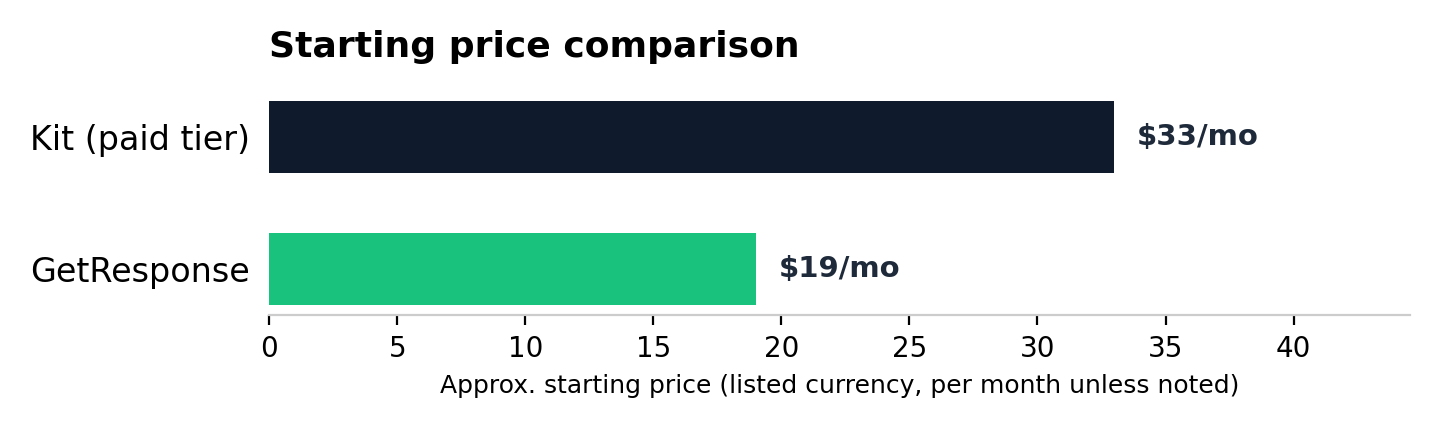
Kit's free Newsletter plan is genuinely free — not a trial — for up to 10,000 subscribers, covering broadcast emails and basic automation. Once you need paid newsletters, more advanced automation or Creator Pro's extras, Kit's paid Creator tier starts at roughly $33/month billed annually (or $39/month billed monthly) at 1,000 subscribers, rising as your list grows. GetResponse has no free plan and starts at around $19/month for 1,000 subscribers, but that entry price already includes landing pages and automation that Kit only unlocks on its paid tier.
Automation comparison, explained plainly
Kit's automation is visual and easy to reason about for creator-style sequences — a welcome series, tagging subscribers by what they're interested in. GetResponse's automation goes deeper — conditional branching (different paths based on subscriber behaviour), lead scoring, and multi-channel triggers — which matters more once your business isn't just "one person, one newsletter."
A real scenario for each
Kit fits: a solo newsletter writer with 3,000 subscribers, one lead magnet, and a simple three-email welcome sequence — nothing more complex needed, and Kit's simplicity means less time spent in menus and more time writing. GetResponse fits: a 3-person consultancy running email for their own list plus building landing pages for quarterly promotions and the occasional webinar — the bundled features genuinely replace what would otherwise be three separate subscriptions.
The simple decision rule
If you are one person selling one thing to one list, Kit's simplicity is a genuine feature, not a limitation — you'll rarely miss what it doesn't have. If you're running a small business or agency with multiple offers or multiple clients, GetResponse's extra depth earns its slightly higher price within the first month of use.
Head to head
| Kit | GetResponse Winner for small business | |
|---|---|---|
| Starting price | Free to 10k subs, then from $33/month | From $19/month, no free plan |
| Best for | Solo creators | Small business & agencies |
| Landing pages | Included | Included |
| Webinars | Not offered | Included on mid tiers |
| Automation depth | Good, creator-focused | Strong, business-focused |
Frequently asked questions
Is Kit or GetResponse better for a newsletter?
Kit, if you're a solo creator running one newsletter — its simpler workflow is built exactly for that use case and won't overwhelm a first-time user.
Which is cheaper, Kit or GetResponse?
Kit's free plan beats GetResponse on cost if you only need basic broadcasts and stay under 10,000 subscribers. Once you move to Kit's paid Creator tier, it's actually pricier per month than GetResponse's entry plan — but GetResponse has no free tier at all, so which is "cheaper" depends entirely on whether Kit's free plan covers what you need.
Can Kit handle multiple clients like an agency would need?
Not well — Kit is built around a single creator's list, not multi-account agency management. GetResponse handles that shape considerably better.
Is Kit easier to learn than GetResponse for a complete beginner?
Generally yes — Kit has fewer menus and a narrower feature set, which makes the first hour less overwhelming for someone who's never used an email tool before.
At what point would a Kit user outgrow it and need GetResponse?
When you need a second product or offer with its own separate funnel, want to host a webinar, or start managing email for more than just your own single list.
Does Kit have good deliverability compared to GetResponse?
Both have solid deliverability reputations for legitimate senders — neither has a meaningful edge here for a typical small list.
The bottom line: Kit for solo creators, GetResponse for small businesses and agencies needing more depth. See our full best email marketing platform roundup for how both compare against Mailchimp too.
The rest of this email marketing series
Part of a full series on email marketing platforms for small businesses and agencies: GetResponse vs Mailchimp, GetResponse review, best email marketing for small business, best email platform for agencies, Kit vs GetResponse, ClickFunnels review, and email marketing for consultants.